Registering an account
Already registered? Go here to find out how to log in.
Getting to the Registration Form
From the Dashboard (home page), click the Register button in the top right corner of the navigation bar.

Filling in the form
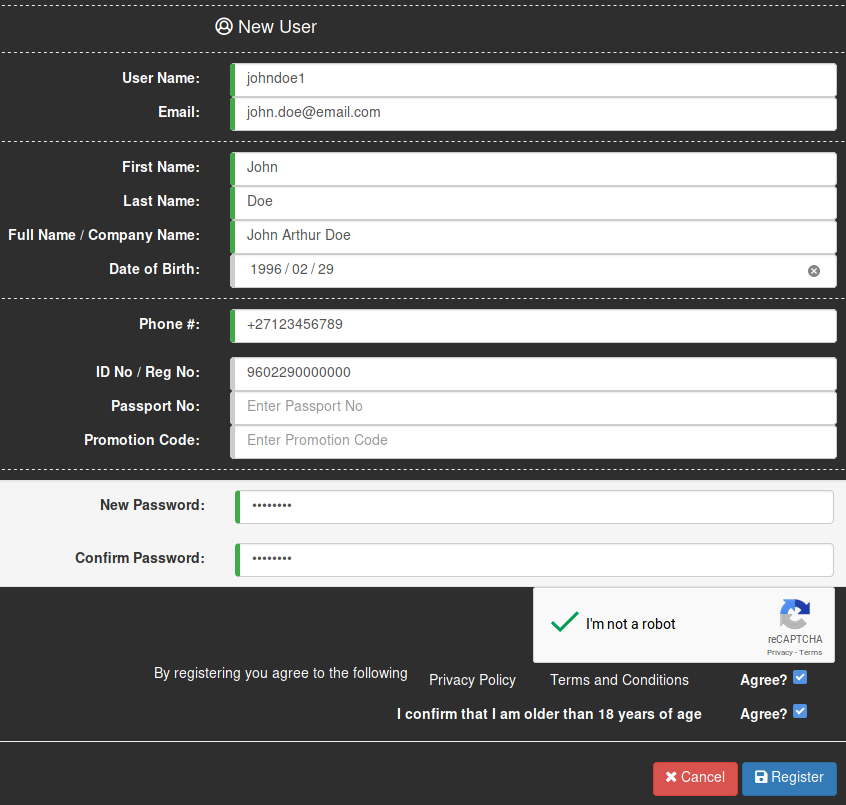
Once you have opened the registration page, you will be met with the form shown below.

- User Name - This is a unique name that you associate with your account. Your username can be any alphanumeric value (numbers and letters), e.g.
johndoe1, but you can choose any creative name! - Email - The email address that you wish to associate with your account. This is also the address we use to send important notifications to. We will verify this address, so make sure you enter it correctly.
- First Name - Your legal first name.
- Last Name - Your legal last name.
- Full Name/Company Name - This will be your full name as it appears on your ID, or the name of a company or other entity that may be represented by your account.
- Date of Birth - Enter the date of your birth here. You can use the convenient date picker by simply clicking on the field, or enter it manually.
- Phone # - This is the phone number that you wish to associate with the account. The number must be in international format, such as
+27123456789. - ID No/Reg No - Your South African ID number or registration number of any company or other entity that your account may represent.
- Passport No - If you do not have a South African ID number or registration number, you can alternatively use your passport number.
- Promotion Code -
- New Password - Enter a password with a minimum length of 8 (containing at least one uppercase character and one digit) here. You will need to enter it every time to access the exchange, so keep it safe and keep it secret!
- Confirm Password - Enter the same password as above. This is to make sure that you didn't accidentally enter the wrong password.
- I'm not a robot - Simply click the box in the CAPTCHA to verify that you are a human. This is to stop bots from registering on the website.
- After reading it, click on the Agree? box to agree to the privacy policy and terms and conditions.
- Click on the Agree? box to confirm that you are at least 18 years of age.
Note: Although both your ID/registration number and passport number are optional for registration, at least one is required to get verified.
When you're done filling the form, you can finally click on the Register button! Here is an example of a completed form.
Finishing up
After completing the registration form, a verification email will be sent to the email address that you entered on the form. Follow the instructions on the email to verify your email address. You will not be able to log in to your account until your email address has been verified, so make sure to do it! If you did not receive a verification email or have any related problems, see here.
Now that you have successfully registered, you will want to get verified in order to start trading!
Making changes
If you entered incorrect details during registration, you can edit your account at any time. Follow the guide here to see how!