Getting verified
Verification levels
CornuEx allows you to have different monthly transfer levels based on amount of detail that you have verified about yourself / your company. The different levels and the monthly limit is provided in the following table:
| Level | Limit (ZAR) |
|---|---|
| 0 | 0 |
| 1 | 5,000 |
| 2 | 10,000 |
| 3 | 250,000 |
| 4 | 1,000,000 |
| 5 | Unlimited |
Verification status
Click on the Verification button on the navigation bar at the top of the web page. This will bring you the the verification page.

On this page you will see different panels as shown below. You can click any panel to expand it and see which steps you need to perform to complete that level. A more detailed explanation of the actions required for each level can be found below.
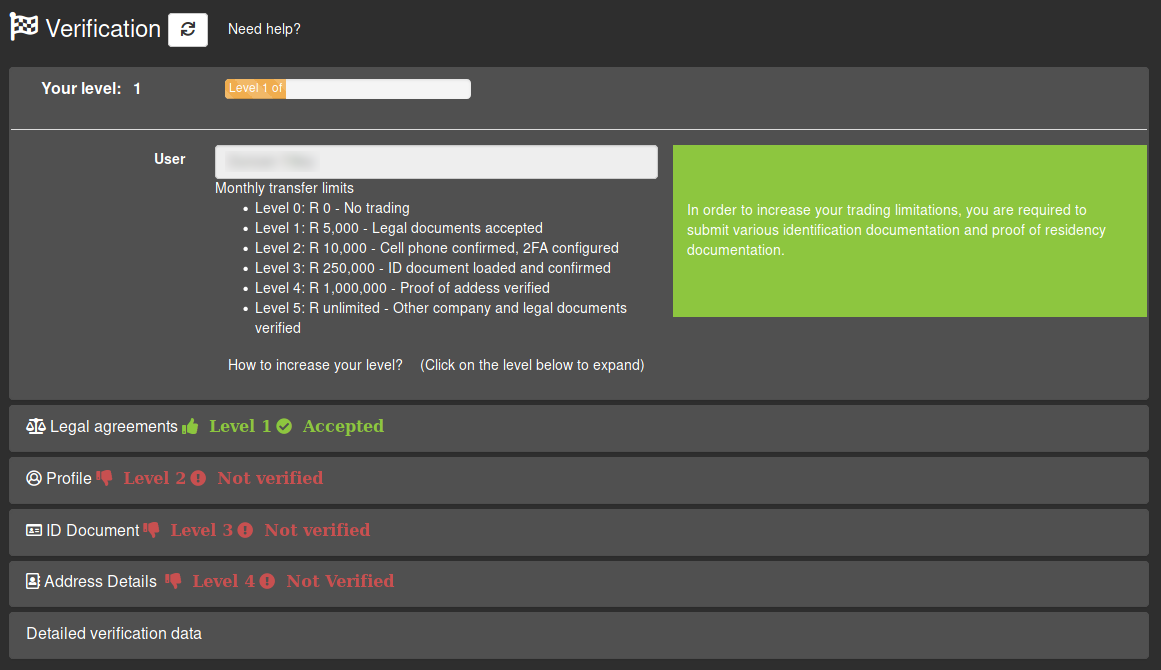
How to get verified
In addition to verifying your email address (done during registration, you will also need to verify more details to unlock a higher transfer limit. Click on the links under the levels below to see how to verify the specific detail. Once each detail for a specific level has been verified, you will unlock the transfer limit associated with that level (provided in the table above).
Level 1
Note: Most users should have Level 1 verification since the Terms & Conditions and Privacy Policy are accepted during registration and the Safety Risk Notice is presented to you during your first login.