Address verification
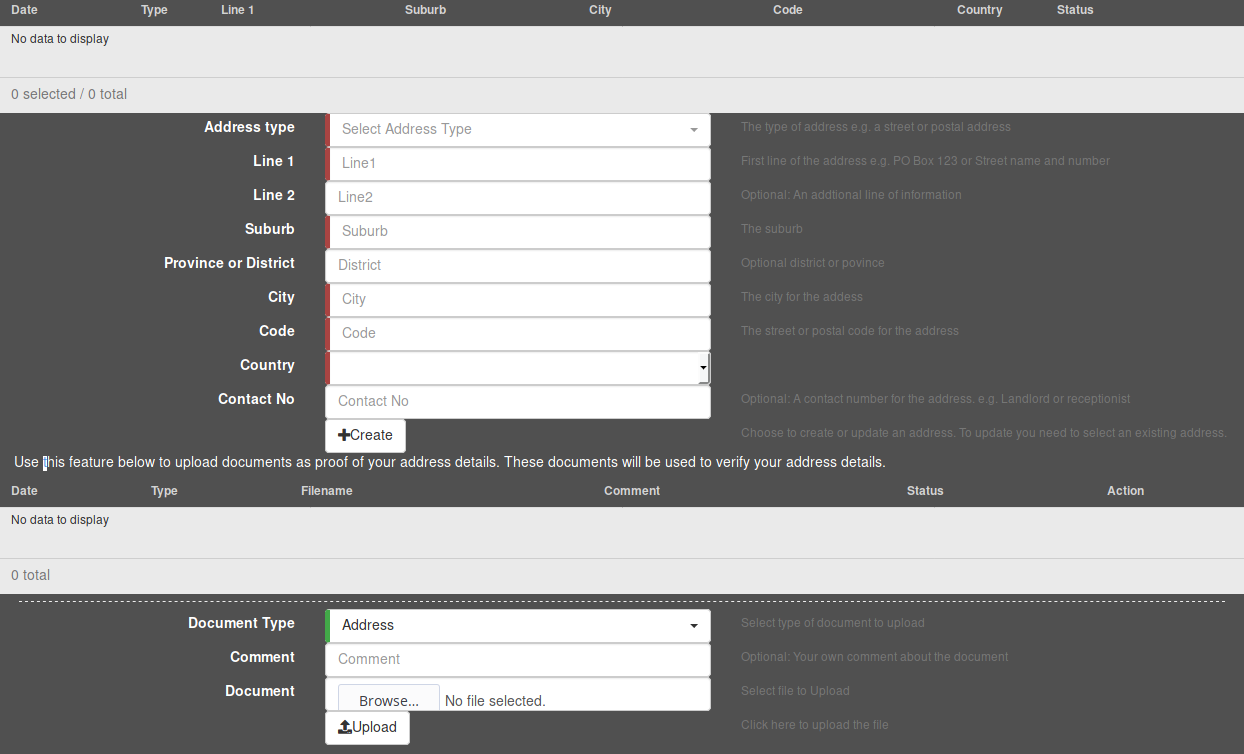
Entered addresses
The top table shows the addresses that you have already added. You can click on the delete button to remove it or click on the table entry to edit and update the address. The table also shows which addresses have been verified. In order to verify an address, you must upload supporting documentation for the address (explained below).
Adding addresses
- To add an address, first select the type of address (street, postal, etc.) from the Address Type dropdown menu.
- Continue to add the relevant details in the text fields provided in the form (fields indicated by a red or green line on the left are required).
- Click on the Create button to add the address.
Once the address is added, you will see an entry containing the address details appearing in the table at the top.
Uploading documents
To upload a document, first choose the appropriate type of document in the Document Type dropdown menu. Next, click on the Browse button to bring up a file browser. In the file browser, navigate to the appropriate document and select it for uploading. Once you have selected the file, verify that you have selected the correct document by looking at the file name to the right of the Browse button, and click on Upload to upload the document.