Wallets
A wallet is exactly what the word says: a virtual wallet that holds a certain type of currency. You have a separate wallet for every type of currency on CornuEx.
Getting to your wallets
On the navigation bar at the top of the page, click the Wallet button.
Can't find the Wallet button? See how to get verified.
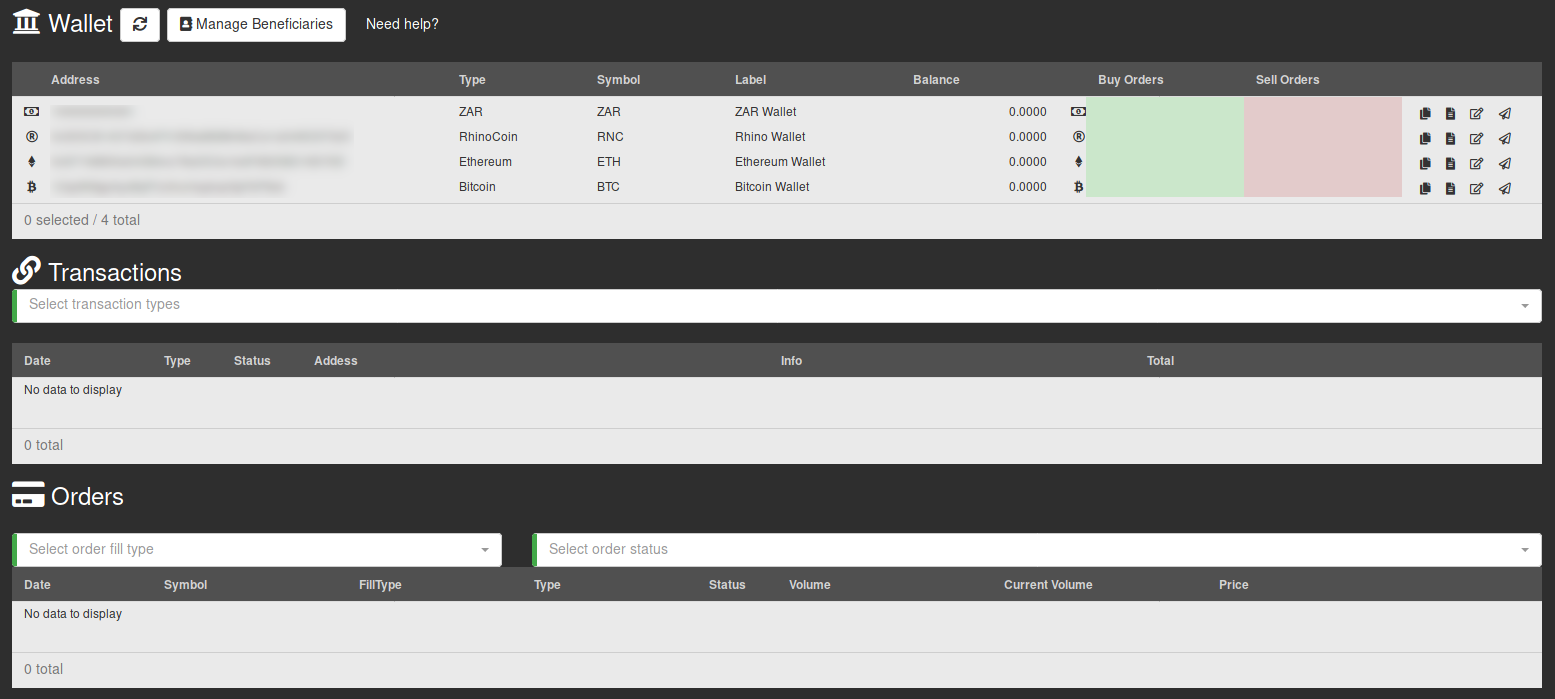
Once you are on the wallet page, you will find three tables, each of which is described below.
Wallet
The Wallet table lists all the wallets linked to your CornuEx account. Each entry in the table lists a wallet as well as the following properties of each:
- The address of the wallet to make deposits.
- The type of currency the wallet holds
- A label which can be customized by clicking on the edit (🖉) button on the right.
- The balance of the wallet in the wallet's currency.
- The value of any outstanding buy or sell orders.
Clicking on a wallet will display the transactions and orders linked to the wallet, explained below.
Transactions
The Transactions table lists the transactions of the selected wallet. These include confirmed transactions as well as transactions that are still awaiting confirmation. Click on the View (📄) button to the right of a transaction to see more details about the specific transaction. More details include the fees attached to each transaction.
Orders
The Orders table lists the orders of the currently selected wallet. These include orders that have already been successfully filled, as well as any outstanding or partially filled orders. Click on the View button to the right of each order for more details on the specific order, or click on the View Transactions (📄) button to see the list of transactions associated with the order.