Trading Guide
After you have verified your account and deposited currency into at least one of your wallets, you are ready to start trading. This guide will take you through the process of making your first trade on CornuEx by creating an order.
- Go to the exchange page and choose the marketplace that you wish to trade on (ZAR/RNC, RNC/ETH, etc.).
- Scroll down on the exchange to find the trading form, illustrated in the following figure:
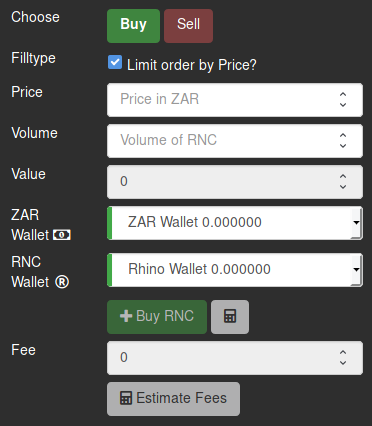
- Choose Buy if you want to buy the currency (e.g. on the ZAR/RNC exchange, you will be buying RNC with ZAR) or choose Sell if you want to sell currency (e.g. on the ZAR/RNC exchange, you will be selling RNC in exchange for ZAR).
- Check the Limit order by Price box if you want to use Limit orders, or leave it unchecked for Market orders.
- Enter the price for which you wish to buy or sell currency.
Note: The price is only specified in Limit orders.
Note: The price will be the amount of the first currency you wish to pay/receive for one unit of the second currency (e.g. on the ZAR/RNC exchange, how much ZAR for 1 RNC).
- Enter the volume (amount) of currency that you wish to buy or sell.
- Once you have entered the price and volume of your trade, you can click on Estimate Fees to see the fees that will be attached to your trade.
- You can now click on Buy or Sell to execute your trade.
- You will now see an order being placed in the order book, unless your order is filled immediately.
- You can keep track of your outstanding orders and transactions relating to the orders on the wallets page.